Archive
The Archive is made up by several tabs, that manage:
the patients;
the operators;
the institutes;
the protocols;
the tags.
STUDIES AND DOCUMENTS
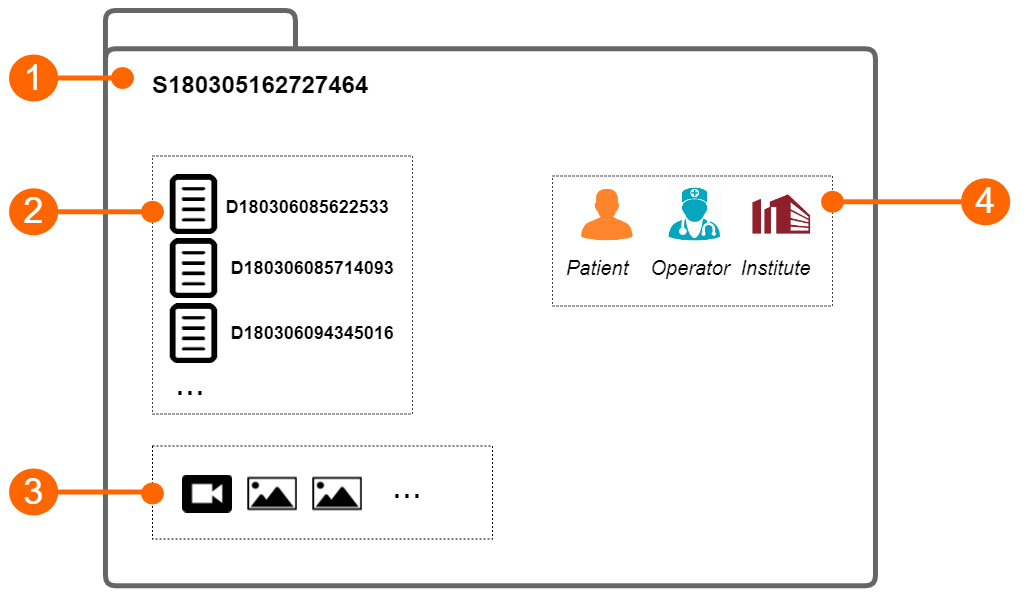
The study (1) contains the results generated by a software application. These results are organized into documents (2) . Each document contains the results of the analysis of a video clip or an image. The study instead may contain one or more media files (video clip or images).
Each study has a unique study identification number (study ID), which is a string starting with the letter "S" and followed by 15 numeric digits. Analogously, each document has a unique document identification number (document ID), which is a string starting with the letter "D" and followed by 15 numeric digits.
Each study can be associated with one or more protocols and each document can be associated with one or more tags.
PATIENTS
The patient is the person who undergo the examination.
Patients have the following data:
Patient ID
First name
Middle name
Last Name
Sex (it can be: "Unspecified", "Female" or "Male")
Birth date (it can be set or "unspecified")
Address (Street, number, City, ZIP, State/Region, Country)
Telephone
E-mail
You can enter no data of the patients. The only mandatory field is the patient ID. If you don't enter patient ID, a random value will be automatically proposed, which is a string starting with the letter "P" and followed by 15 numeric digits.
OPERATORS
The operator is the person who make the examination.
Operators have the following data:
First name
Middle name
Last Name
Birth date (it can be set or "unspecified")
Telephone
E-mail
Picture
Operators have also a username and a password that are needed to use Cardiovascular Suite. When the software starts, the operator must login with its username and password.
Three classes of operator are available in Cardiovascular Suite:
Admin. They have full access to the software.
Users. They have full access to the software, but cannot manage users and access Advanced settings
Read-only users. These users can only read the archive and the documents.
Operator have also a status that can be active or disabled. If an operator has been disabled, he/she cannot access to the software.
It is possible to modify a user account and to add a new one in the Operators management panel.
INSTITUTES
The institute is the organization where the examination is performed.
Institutes have the following data:
Name
Address (Street, number, City, ZIP, State/Region, Country)
Telephone
Fax
E-mail
Picture
PROTOCOLS
The protocol is a particular experiment or proceeding which a study or more than one may be associated with.
Protocols have the following data:
Name
Description
TAGS
The tag is a particular label which a document, or more than one, may be associated with.
Cardiovascular Suite has two types of tags:
System tags, which are already defined in the software and are used to specify which documents will be included in the study report.
Custom tags, which are defined by the user and are used to better identify a document.
Only one system tag can be associated to a document.
Custom Tags have the following data:
Name
Description