Copy of Video window
T he Doppler Region of Interest (ROI) is the portion of the image where the Doppler velocity is computed. It should include all the PW Doppler velocity waveform and exclude any graphic item that can affect the analysis.
The zero line is automatically located while tracing the Doppler ROI. Each time the ROI is modified, the position of the zero line will be automatically recomputed.
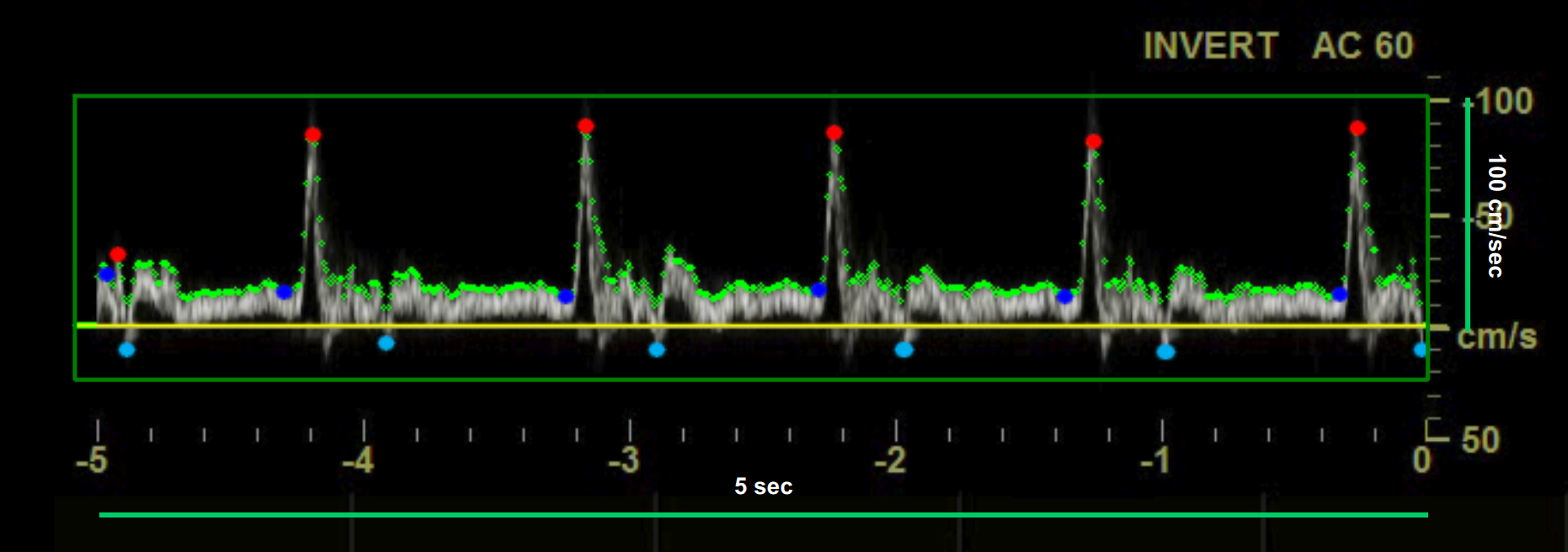
The green points show the envelop of the Doppler velocity waveform.
The red points show the maxima.
The light-blue points show the minima.
The blue points show the minima of the positive values.
Drawing a new ROI:
Click the Set ROI
 button in the Setup panel
.
button in the Setup panel
.Click inside the video window and drag until the ROI is complete (the size of the ROI is shown in the Setup panel).
When you release the mouse, the analysis is initialised.
Resizing the ROI:
Click on one of the sides or one of the corners of the ROI.
Drag to change the size of the the ROI.
M oving the ROI:
Click and hold inside the ROI.
Drag the ROI to the location of interest.
A s an alternative, you can modify the size/position of the ROI by typing the value in the Setup panel.
Re-initializing the ROI:
Click inside the Doppler ROI to re-initialize the Doppler analysis
Setting the sensitivity of the Doppler detection algorithm
Use the Sensitivity slider in the Doppler ROI section of the Setup panel to adjust the sensitivity of the algorithm that is used to detect the envelop of the Doppler velocity waveform
Adjusting the position of the zero line
Click the Zero Line Move up/down

 buttons
in the Doppler ROI section of the Setup panel
to adjust the position of the zero line.
buttons
in the Doppler ROI section of the Setup panel
to adjust the position of the zero line.
These manual adjustment may be used in case the automatic detection of the zero line is not precise.